Validation modes
The validation prop controls how strictly the component checks for proper placeholder usage and table structure.
Validation levels
The ListTable component supports three validation modes:
'strict'- Tables with structural issues will show an error instead of rendering'warn'(default) - Tables render normally but log warnings to the console'off'- No validation, allows flexible syntax without placeholders
Strict mode
In strict mode, tables with structural issues will show an error message instead of rendering. This is useful during development to catch mistakes early.
Table Validation Errors:
- Row 2, Col 1: Placeholder found that doesn't belong to a rowSpan or colSpan.
MDX source
<ListTable headerRows={1} validation="strict" caption="Strict validation example">
- - Name
  - [c2] Info
  - _
- - _
  - Email
  - Phone
- - Alice
  - alice@example.com
  - 555-0100
- - Bob
  - bob@example.com
  - 555-0200
</ListTable>
In this example, strict validation indicates that there's a placeholder in row 2, column 1, that doesn't belong two a rowSpan or colSpan. With strict validation, placeholders must match up to a corresponding rowSpan or colSpan.
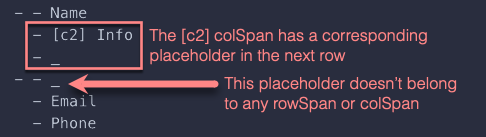
To fix this instance, you could add an [r2] rowSpan to row 1, column 1 ("Name"). For this fix to work you would also need to set headerRows to 2 so that row 1 could legitimately span onto another header row (row 2).
| Name | Info | |
|---|---|---|
| Phone | ||
| Alice | alice@example.com | 555-0100 |
| Bob | bob@example.com | 555-0200 |
MDX source
<ListTable headerRows={2} validation="strict" caption="Strict validation example">
- - [r2] Name
  - [c2] Info
  - _
- - _
  - Email
  - Phone
- - Alice
  - alice@example.com
  - 555-0100
- - Bob
  - bob@example.com
  - 555-0200
</ListTable>
Warn mode (default)
Warn mode is the default validation level. Tables will render normally, but structural issues are logged to the browser console. This is the recommended setting for production.
| Name | Info | |
|---|---|---|
| Phone | ||
| Alice | alice@example.com | 555-0100 |
MDX source
<ListTable headerRows={1} caption="Warn mode example">
- - Name
  - [c2] Info
  - _
- - _
  - Email
  - Phone
- - Alice
  - alice@example.com
  - 555-0100
</ListTable>
Check the browser console to see any validation warnings. As an example, the table above causes Chrome developer tools to show the following message in the console:
[ListTable caption="Warn mode example"] error: Placeholder found that doesn't belong to a rowSpan or colSpan. Row 2
Even if there are issues, the table will attempt to render.
Off mode
With validation turned off, you can use more flexible syntax. This is useful when you want simpler markdown without worrying about exact placeholder placement.
| Name | Contact Info | |
|---|---|---|
| Phone | ||
| Alice | alice@example.com | 555-0100 |
| Bob | bob@example.com | 555-0200 |
MDX source
<ListTable headerRows={1} validation="off" caption="Flexible syntax">
- - Name
  - [c2] Contact Info
- - _
  - Email
  - Phone
- - Alice
  - alice@example.com
  - 555-0100
- - Bob
  - bob@example.com
  - 555-0200
</ListTable>
Notice how in "off" mode, we didn't need to add the trailing placeholder _ after [c2] Contact Info in the first row. In addition, no messages are logged to the browser console about this table. The component is more forgiving about placeholder placement.
Comparison example
Here's the same table structure rendered with all three validation modes:
Strict mode
Table Validation Errors:
- Row 2, Col 1: Placeholder found that doesn't belong to a rowSpan or colSpan.
Warn mode
| Team | Contact Methods | |
|---|---|---|
| Phone | ||
| Engineering | eng@company.com | ext. 100 |
| Design | design@company.com | ext. 200 |
Off mode
| Team | Contact Methods | |
|---|---|---|
| Phone | ||
| Engineering | eng@company.com | ext. 100 |
| Design | design@company.com | ext. 200 |
MDX source
<ListTable headerRows={1} validation="strict" caption="Team contact list (strict)">
- - Team
  - [c2] Contact Methods
  - _
- - _
  - Email
  - Phone
...
</ListTable>

<ListTable headerRows={1} caption="Team contact list (warn)">
- - Team
  - [c2] Contact Methods
  - _
- - _
  - Email
  - Phone
...
</ListTable>

<ListTable headerRows={1} validation="off" caption="Team contact list (off)">
- - Team
  - [c2] Contact Methods
- - _
  - Email
  - Phone
...
</ListTable>
When to use each mode
- Strict: Use during development to catch structural errors early. Best for ensuring table correctness before deployment.
- Warn: Use in production. Provides helpful debugging information without breaking the page.
- Off: Use when you prioritize authoring simplicity over strict validation, or when working with dynamically generated content where placeholder management is difficult.