ListTable component
The ListTable component enables you to create complex HTML tables with merged cells using simple Markdown list syntax.
Why ListTable
Traditional Markdown tables have drawbacks:
- True multi-line content doesn't work in table cells
- Merged cells (rowspans and colspans) aren't supported
- Table captions aren't supported
- Header columns aren't supported
- Markdown tables are often tedious to create and messy to read
The ListTable component addresses all of these issues, and you won't have to manually type out HTML table tags.
ListTable generates accessible tables out of the box. See Accessibility for more details.
Basic syntax
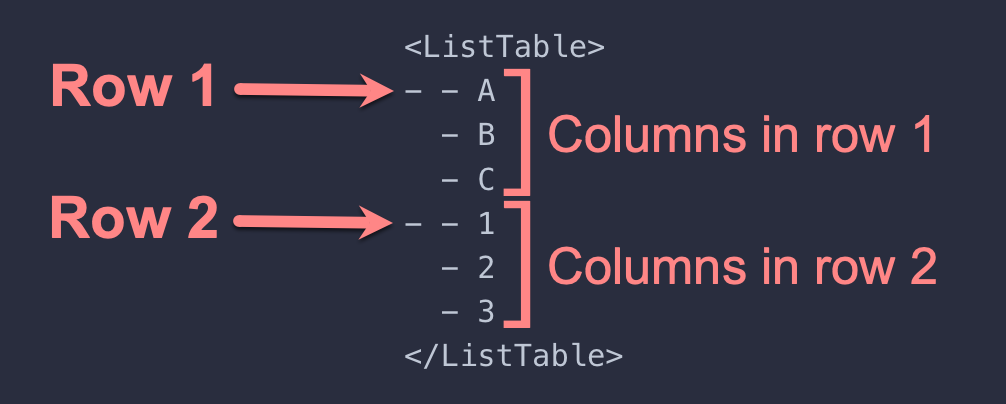
Create a nested list inside the <ListTable> component. The outer list defines the rows. The inner lists define the columns.
Basic example
<ListTable>
- - A
  - B
  - C
- - 1
  - 2
  - 3
</ListTable>
Result
| A | B | C |
| 1 | 2 | 3 |
Multi-line content
ListTable cells support multiple paragraphs, lists, block quotes, images, and so forth.
| Content type | Example |
|---|---|
|
Multiple paragraphs |
This is a paragraph. This is another paragraph in the same cell. |
| Lists |
|
| Block quotes |
|
| Admonitions |
danger Do not mess with Bob. |
| Images |  |
MDX source
<ListTable headerRows={1} caption="Multi-line content example">
- - Content type
- Example
- - Multiple paragraphs
- This is a paragraph.
This is another paragraph in the same cell.
- - Lists
- - This is a list in a cell.
- Lists can have multiple items.
- This list has three.
- - Block quotes
- > This cell has a block quote in it.
>
> Block quotes can have multiple paragraphs.
- - Admonitions
- :::danger
Do not mess with Bob.
:::
- - Images
- 
</ListTable>
Merged cells (rowspan and colspan)
Traditional Markdown doesn't support rowspan or colspan attributes in tables. The ListTable component bridges this gap by using special syntax in list items:
[r2]- Creates a rowspan of 2[c3]- Creates a colspan of 3[r2c3]- Combines both (rowspan=2, colspan=3)_- Placeholder for cells occupied by earlier spans
Here's a simple table with a rowspan:
| Name | Role |
|---|---|
| Alice | Developer |
| Designer | |
| Bob | Manager |
MDX source
<ListTable headerRows={1} caption="Simple rowspan example">
- - Name
  - Role
- - [r2] Alice
  - Developer
- - _
  - Designer
- - Bob
  - Manager
</ListTable>
Custom styling
Apply custom CSS classes with the className prop:
<ListTable className="my-table striped-rows" headerRows={1}>
- - Feature
  - Status
- - Dark mode
  - Supported
- - Responsive
  - Built-in
</ListTable>
Then style with CSS:
.my-table {
  border: 2px solid #333;
}

.striped-rows tbody tr:nth-child(even) {
  background-color: #f5f5f5;
}
Browse the examples
Use the sidebar to explore different examples:
- Basic Examples - Learn the fundamentals of rowspan, colspan, and merged cells
- Rich Content - See how to use formatted text, code, and complex content in cells
- Real World Examples - Practical tables like pricing matrices and API references
Installation
Install using npm:
npm install mdx-list-tables
Then import and use in your MDX files:
import { ListTable } from 'mdx-list-tables';

<ListTable headerRows={1}>
- - Header 1
  - Header 2
- - Cell A1
  - Cell A2
- - Cell B1
  - Cell B2
</ListTable>